Every Shanmon operator sees backhoe dashboard lights and wonders what they mean. All Shanmon backhoe loaders feature warning lights alerting drivers to system faults, needed maintenance, or important notices. These lights might signal minor issues like an open door, but they can also indicate serious problems requiring hydraulic system checks.

Some lights briefly illuminate during startup system checks. They automatically turn off afterwards and only reappear if the system detects a problem. When a warning light stays on, learn the Shanmon code meaning before continuing operation. This helps you assess the problem’s urgency and take proper action.
Check our guide below for details on any warning light symbol. Shanmon backhoe dashboard lights give vital machine health and safety information. Understanding these symbols helps operators avoid costly repairs and keep construction sites safe. Always address warning lights promptly for safe and efficient machine use.
Gauges & Switches of Shanmon Backhoes
| Dashboard Indicator Lights | |||||||||
 |  |  |  |  |  |  |  |  |  |
| 1.1 | 1.2 | 1.3 | 1.4 | 1.5 | 1.6 | 1.7 | 1.8 | 1.9 | 1.10 |
 |  |  |  |  |  |  |  |  | |
| 1.11 | 1.12 | 1.13 | 1.14 | 1.15 | 1.16 | 1.17 | 1.18 | 1.19 | |
| Cabin Buttons & Switches | |||||||||
 |  |  |  |  |  |  |  |  |  |
| 2.1 | 2.2 | 2.3 | 2.4 | 2.5 | 2.6 | 2.7 | 2.8 | 2.9 | 2.10 |
 | |||||||||
| 2.11 | |||||||||
Dashboard Indicator Lights
1.1 Battery Charging Indicator. If this light illuminates, it means alternator malfunction occurs or battery voltage is low.
1.2 Gearbox Oil Temperature Indicator. If this light illuminates, it means gearbox oil overheats (over 120°C).
1.3 Engine Oil Pressure Indicator. If this light illuminates, it means engine oil pressure is too low (below 0.1 Mpa).
1.4 Engine Oil Temperature Indicator. If this light illuminates, it means engine oil overheats (over 100°C).
1.5 Park Brake Indicator. If this light illuminates, it means park brake is on.
1.6 Brake Air Pressure Indicator. If this light illuminates, it means brake air pressure is too low (below 0.45Mpa).
1.7 Gearbox Oil Pressure Indicator. If this light illuminates, it means gearbox oil pressure is too low (below 1.2Mpa).
1.8 Alert Indicator. If this light illuminates, it means a malfunction occurs.
1.9 Diesel fuel Indicator. If this light illuminates, it means lack of diesel fuel.
1.10 Heater Indicator. If this light illuminates, it means engine heater is on.
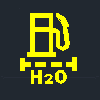
1.11 Oil-water Separator Indicator. If this light illuminates, it means need to change oil-water separator.
1.12 Left Turn Indicator. If this light illuminates, it means you turned the signal switch left.
1.13 right Turn Indicator. If this light illuminates, it means you turned the signal switch right.
1.14 Low Beam Indicator. If this light illuminates, it means low-beam headlights are on.
1.15 High Beam Indicator. If this light illuminates, it means high-beam headlights are on.
1.16 Neutral Indicator. If this light illuminates, it means transmission gear is in neutral.
1.17 4-wheel Steering Indicator. If this light illuminates, it means 4-wheel steering mode is on.
1.18 2-wheel Steering Indicator. If this light illuminates, it means 2-wheel steering mode is on.
1.19 Crab Steering Indicator. If this light illuminates, it means crab steering mode is on.
Cabin Buttons & Switches
2.1 Rear Wiper Button. Pressing this button activates the rear wiper.
2.2 Sideshift Button. This button engages the sideshift function. The rear boom could move side to side after you press it.
2.3 Rear Work Light Button. Press this button to turn on the rear work light.
2.4 Beacon Button. Activate the roof beacon by pressing this button.
2.5 SRS Button. Engage the ride control (SRS) function with this button.
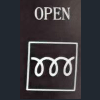
2.6 Heater Button. This button starts the engine heater.
2.7 Hazard Flasher Button. Pressing this button activates the hazard warning lights.
2.8 Master Light Button. Use this button to power dashboard and work lights.
2.9 Front Work Light Button. Press here to switch on the front work light.
2.10 Steering Mode Switch. Rotate this switch to change steering modes.
2.11 Drive Mode Button. Press here to switch 2-wheel drive mode or 4-wheel drive mode.